
Turn every video call into focused time with a practical meeting workflow built for modern teams, clients, freelancers, and remote collaborators. This page gives you a clear way to prepare, participate, document decisions, and follow up after online meetings without adding more admin to your day. Use it for formal video conferencing, quick video chat check-ins, or even a video call in Snapchat when the conversation needs to stay productive.
What makes a video call productive?
A productive video call has a clear purpose, the right people, a shared agenda, and a simple follow-up plan. It is not just a camera-on version of a phone call; it should help participants make decisions, solve blockers, or build alignment faster than an email thread could. When the call ends, everyone should know what was discussed, what was decided, and what happens next.
The easiest way to improve your calls is to remove friction before the meeting starts. That means setting expectations, checking your setup, reducing distractions, and deciding how notes, screen shares, and any video call screen shot will be handled. A little structure protects everyone’s time.
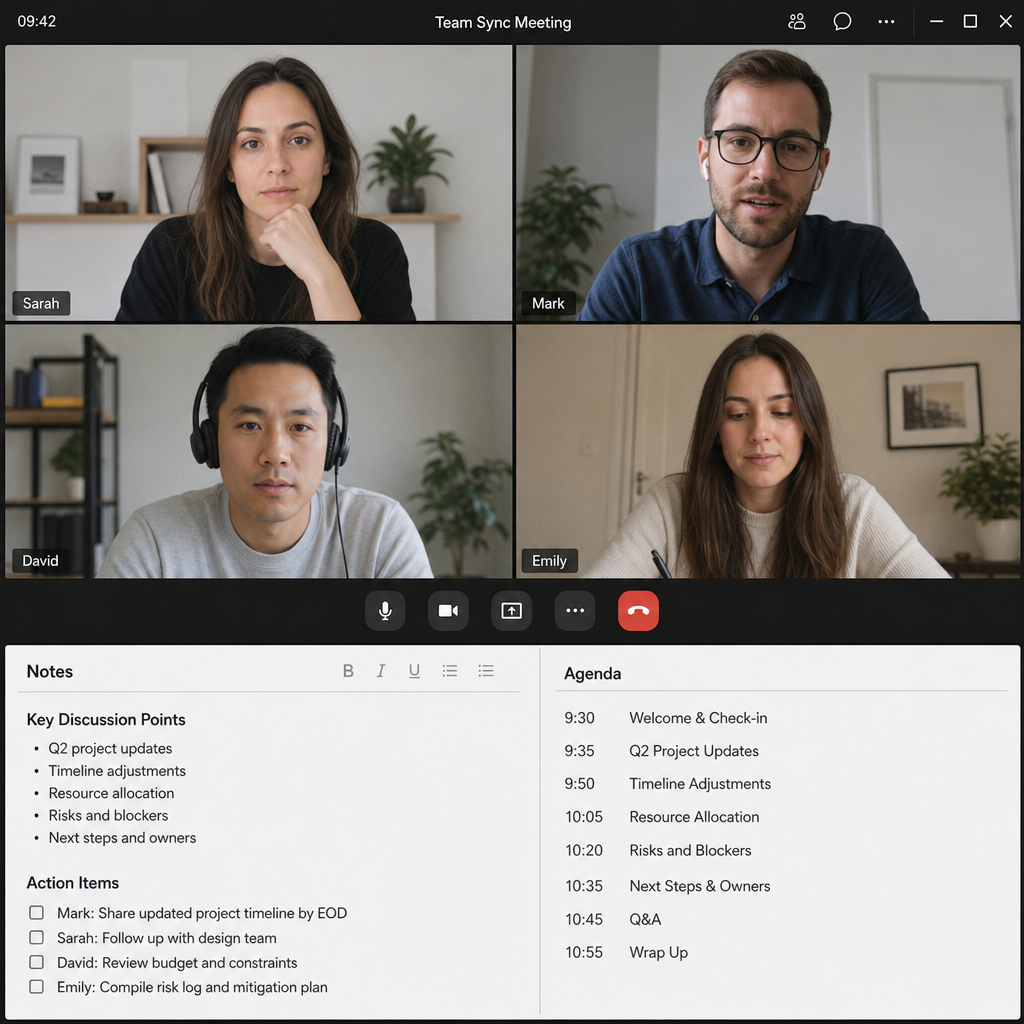
A simple system for better online meetings
Better online meetings do not require a complicated process. They need a repeatable rhythm that helps people show up prepared and leave with clarity. Use this system before, during, and after each call so meetings feel intentional rather than improvised.
Before the call:
Define the outcome in one sentence, such as “approve the draft,” “choose the next task,” or “review the client feedback.”
Invite only the people who can contribute, approve, or take action.
Share the agenda ahead of time, even if it is just three bullets.
Test your microphone, camera, lighting, and internet connection.
Close unnecessary tabs and silence unrelated notifications.
Choose a clean background or a simple phone call background video only when it supports the setting and does not distract.
During the call:
Start by naming the goal and expected finish time.
Keep one person responsible for notes and action items.
Use screen sharing when it saves explanation, not as a default habit.
Pause for decisions and repeat them clearly before moving on.
Ask quiet participants for input when their role matters.
Keep side topics in a parking lot for later.
After the call:
Send a short recap with decisions, owners, and deadlines.
Attach approved files or links in one place.
Clarify anything that was left unresolved.
Cancel the next recurring meeting if the work no longer needs it.
Designed for real video chat situations
Not every call happens in a polished boardroom setting. Some conversations start as a quick video chat from a laptop, a mobile check-in between tasks, or a short video call snap with someone who needs an immediate answer. Productivity still matters in those casual moments because unclear conversations create extra messages later.
This approach works across different formats because it focuses on behavior, not a specific platform. Whether you are using workplace video conferencing software, a client meeting link, or a video call in Snapchat for an informal conversation, the same habits apply: know the point, reduce noise, capture the outcome, and follow through.
Use it when you need to:
Run client check-ins without letting the conversation drift.
Hold team standups that surface blockers quickly.
Review creative work while everyone sees the same screen.
Interview candidates or contractors with a consistent structure.
Coach, teach, or consult without losing track of next steps.
Replace long message threads with one focused conversation.
Capture details without creating privacy problems
Screenshots and recordings can help people remember what happened, but they should be handled carefully. A video call screen shot may capture faces, messages, shared documents, browser tabs, or private information that was not meant to be saved. Before taking one, make sure it is appropriate, necessary, and allowed by the people and policies involved.
A safer habit is to capture decisions in written notes instead of relying on images. If a screenshot is useful, announce it first and explain what it will be used for. Crop out unrelated content, store it in the right place, and avoid sharing it in casual channels where context can disappear.
For professional calls, build a lightweight documentation rule:
Write decisions as text first.
Use screenshots only for visual clarification.
Name the file clearly so people can find it later.
Share it with only the people who need it.
Delete temporary captures when they are no longer useful.
Better calls start with a better environment
Your environment shapes the quality of the conversation. People do not need a studio setup, but they do need to hear you clearly, see you without strain, and understand that you are present. Small changes can prevent interruptions and make every video call feel more professional.
Start with audio, because poor sound slows everything down. Use headphones if your space creates echo, mute when you are not speaking, and move away from background noise when possible. Then check your camera angle and lighting so your face is visible without harsh shadows.
A background can support the call or compete with it. A tidy room, neutral virtual background, or subtle phone call background video can work if it does not pull attention away from the conversation. Avoid busy motion, personal information, or anything that makes screen focus harder.
Your quick-start video call checklist
Use this checklist before your next call. It is short enough for daily use and structured enough to prevent the most common meeting problems.
Purpose: I know why this meeting exists.
Agenda: The main topics are visible to everyone.
People: Only necessary participants are invited.
Setup: Audio, camera, lighting, and connection are ready.
Focus: Notifications and unrelated tabs are closed.
Notes: Someone is capturing decisions and action items.
Consent: Screenshots, recordings, or shared visuals are handled transparently.
Follow-up: Owners, deadlines, and next steps will be sent after the call.
If one of these items is missing, fix it before the meeting starts or say so at the beginning. That single moment of clarity can save ten minutes of confusion later.
Build a meeting habit your team can keep
Productivity improves when the process is easy to repeat. Choose one call this week and apply the checklist from start to finish. Then keep what worked, remove what felt unnecessary, and make the habit part of your normal online meetings.
Ready to make your next video call more focused? Use the checklist, share it with your team, and start turning every video chat into clearer decisions, shorter follow-ups, and better use of everyone’s time.